How to Create a Website Design Using Free Web Page Templates?
Templates are used to make the website look and feel consistent. All websites are built using templates and many website authoring tools and packages include templates. Here we will look at the templates that are available and go on to make web pages using these templates.
Template Types
Templates are created by designers using various tools, and some i.e. FrontPage templates may require the hosting server to support FrontPage Extensions. Therefore my advice for beginners is to avoid templates of this type and use only plain HTML templates. Some of the types you will see are:
Most Websites offer themed templates like:
-
kids
-
business
-
computers
-
music
-
Internet
There is nothing to be wary of here just choose the appropriate theme for your Website.
Obtaining free Web Page Templates
There are many websites on the Internet offering free high quality website templates. Usually all they ask is that you register with them. Here are a few links to some free website template sites.
After deciding on the template and downloading it to your machine you usually need to unZip it using Winzip. Once unzipped you can now modify the template and use it. The screenshot below shows the template files for a free template I downloaded from www.myfreetemplates.com .

Modifying a free Template
The templates that you download will all need modifying before you can use them. The main things you need to change are the navigation options and the logo. This short tutorial shows you how to modify a template.
How To Use a free Website Template
The template is used to create each page in our website. You simply open the template and type in the text we want and then save it using a different file name. It is always a good idea to create a few backup copies of the template in case you overwrite the original. In order to do this we require a WYSIWYG editor. The one I used here is Trellian Webpage which is available for free and is a very good web page editor. However; if you have FrontPage or DreamWeaver then they will work as well.
Modifying A Website Template
1. Open the template file (.htm) using the Trellian web page editor and then save it as website-template.html . or website-template.htm. The original is here.
2. You may wish to turn off the tags detail by going to edit>folder options and deselecting show details .
3. To edit the navigation then right click on the navigation button you wish to change and select edit html .
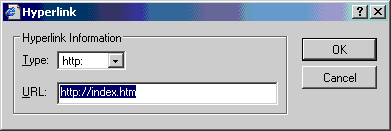
4. Delete the current entry in the URL field and then select http in the type field. Then enter the URL for your page in the url field. The screen shot shows changing the home button to point to index.htm .
5 To delete a menu item select it using the mouse and then hit the delete key.


6 To modify the banner area then right click on the image you want to change and select properties and change the image in the source field (see screen shot below). You can also resize the image if you want. If you want to delete the image then just remove the image link completely. The images are contained in table cells to delete the cells click on the image which in turn selects the cell and hit delete .

7. Delete or modify the copyright notice on the bottom.
8. Delete the text in both columns.
9. Change the page title by selecting Tools>Meta tag Editor
9. The modified template is here:

Myth of Multi-Page Web Templates Design
This article is the second in a series where we will discuss common myths about shopping for a web site template. We felt that consumers should be aware of what to look for in a quality design that encompasses everything from metas right down to copyright footers. Naturally, we would love for our visitors to purchase our templates, but the long-term goal of this series is to educate consumers about what templates are, what they should provide the end-user, and what to be wary of when shopping.
Many people believe that when they shop for a template they need to buy a package that contains 5-10-25+ pages which may already include an about page, FAQ, contact page, ordering, etc. This is simply not true at all. Why pay $15-$25-$50-$100+ for a multi-page template package when all you have to do is open the initial template page into your HTML editor just like they did and change the links in the HTML source code to the links you will name your pages. Then do a File > Save As > about.html or whatever other name you want to use. All your links are already in place on all your pages without manipulating individual pages which is a big time waster. The next step is to add your body content which will mostly likely be different on every page anyway.
Purchasing this type of multi-page package can be a big mistake. And here is why:
- If you have other pages you need to add that are not already included or if you need to delete pages you will not be using, you have to add links and/or change links in the HTML source code on all the pages the designer created for you.
- Think of the money you would be wasting purchasing a product that literally takes a few *seconds* to do once the initial template is created.
- Often times these designers stuff these unnecessary pages full of filler text that you have to delete - on each page - prior to adding your own page content. Or worse {yikes!} ... they put instructions inside these pages and YOU have to delete your instructions before you can add your own text! Wow!
- Why pay $50 for a 10 page package when that money could be better spent on a BasicTemplates.com membership where you will have access to 800+ web templates that are designed correctly? If you have no reason to have access to such a quantity, then by all means ... browse the complete Web Template Gallery where you can buy ANY of these templates for ONLY $5.00 EACH. Doesn't that sound more economical and easier on your wallet? ;) If not, we can provide you with a list of other template designers who are honest, experienced in their field and deliver a properly designed web template.
So why are template designers selling these multi-page package? The answer is very simple ... they think it justifies an extra cost. Obviously, it initially sounds better to those who don't know that it isn't necessary and can actually cause much more work than required with a properly designed template. Why are we telling you this? We obviously would like you to subscribe to a membership; however, after exclusively designing web templates since 1994, we cringe when we see the scams taking place online now. To us this is simply soooo - not right.
We are certainly not saying that all web template multi-page packages are a scam. The majority of those we have seen certainly are and from the experienced designers' perspective it is completely unnecessary. The type of multi-page template packages you might need (although 50% of the sites would still not need especially those folks who have an average amount of web design experience) would be those that have *extensive* variation layouts of the main template page. We are merely advising the consumer to be cautious. Now that you have been armed with this bit of little known information, we encourage you to shop around for the best price vs. the type of quality you should expect in your site's design.
| 


